Use first
WireGuard
“Fastest. Best for everyday use where VPNs aren’t blocked.”
Where VPNs aren’t blocked, that’s all you need.
AmneziaWG client
AmneziaWG is WireGuard in disguise, for networks that detect and block VPN traffic. It’s built into the latest CopVPN apps, so you get a ready AmneziaWG client with nothing to set up. Pick it in Settings when a network stops a regular connection.
Every CopVPN app lets you choose any of the 5 protocols; the browser extension uses Secure Proxy.
A network that detects VPNs
WireGuard · the network sees a VPN pattern and blocks it
Some networks look for the pattern of a plain WireGuard connection and block it.
The protocol
AmneziaWG builds on WireGuard and changes how its traffic looks. Some networks look for the pattern of a plain WireGuard connection and block it. AmneziaWG disguises that pattern, so it’s harder for those networks to tell that you’re using a VPN.
Underneath, it’s still WireGuard. It uses the same built-in cryptography, ChaCha20-Poly1305, so disguising the traffic doesn’t change how it’s encrypted.
Comparison
Use first
“Fastest. Best for everyday use where VPNs aren’t blocked.”
Where VPNs aren’t blocked, that’s all you need.
Switch to it
“Disguised WireGuard. For networks that detect and block VPN traffic.”
Use it when WireGuard won’t connect on a network that otherwise works. Back home, switch back to WireGuard or Optimal. Choose Optimal and Smart Connect tries another protocol by itself if one can’t connect.
No setup
On your own
If AmneziaWG is blocked too: the most restrictive networks may stop AmneziaWG as well. Then switch to Stealth: “Looks like ordinary web browsing. For the most restrictive networks, when everything else is blocked.”
How VPN obfuscation with Stealth worksIn the apps
It’s built into the latest CopVPN apps for Windows, Mac, Linux, iPhone, iPad, Android and Android TV. Older app versions don’t show AmneziaWG, so update the app if it’s missing. Every app connects to the free locations without a plan; for every location, see the VPN plans. On Windows, AmneziaWG is part of the Windows VPN app.
| App | Where to find it | Good to know |
|---|---|---|
| Windows | Settings › Connection › Protocol | Choose AmneziaWG. The protocol chip under the connect button on the Home screen opens the same picker. |
| Mac | Settings › Connection › Protocol | Choose AmneziaWG in the CopVPN app from the Mac App Store. |
| Linux | Settings › Connection › Protocol | The same steps as Windows, in the .deb for Ubuntu and Debian. |
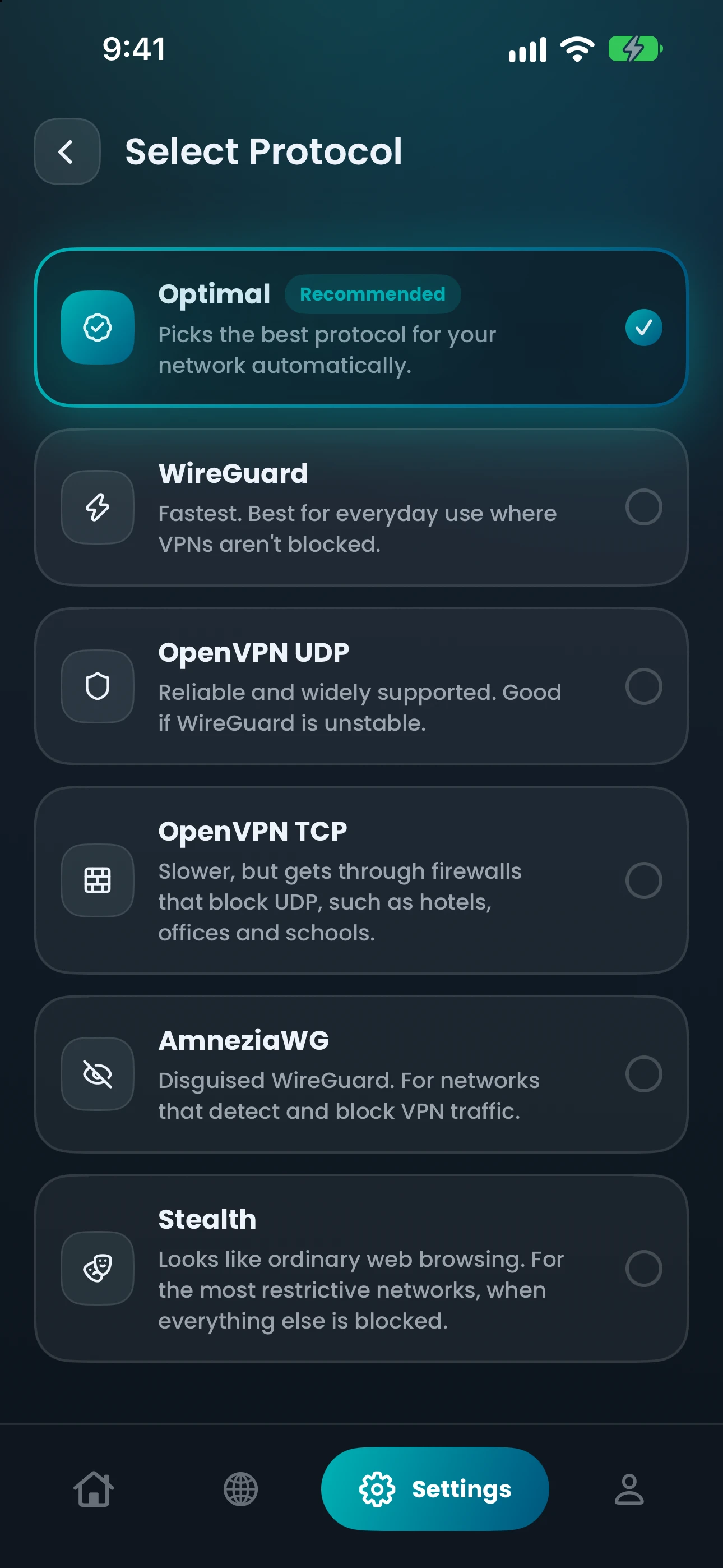
| iPhone and iPad | Settings › Protocol | Choose AmneziaWG on the “Select Protocol” screen. |
| Android | Settings › Protocol | Choose AmneziaWG on the “Protocols” screen, on phones and tablets. |
| Android TV | Settings › Protocol | The same picker as the phone app. |
| Browser extension | Not available | The Chrome, Edge and Firefox extensions use “Secure Proxy” and protect the browser only. |
Questions
Our support team answers by email.
contact@copvpn.comAmneziaWG is disguised WireGuard. It keeps WireGuard’s built-in cryptography and changes how the traffic looks, for networks that detect and block VPN traffic. In CopVPN, you’ll find it in the protocol picker of the latest apps.
Both use the same encryption. WireGuard is for everyday use where VPNs aren’t blocked. AmneziaWG disguises WireGuard traffic, for networks that detect and block VPNs. Use WireGuard first, and switch to AmneziaWG when a network gets in the way.
No. AmneziaWG is built into the CopVPN apps for Windows, Mac, Linux, iPhone, iPad, Android and Android TV. Choose it in Settings and connect. There’s nothing else to install and nothing to import.
Yes. AmneziaWG on iOS is part of the latest CopVPN app for iPhone and iPad: open Settings › Protocol and choose AmneziaWG on the “Select Protocol” screen. You can choose it without a plan, on the free locations.
No VPN works on every network. AmneziaWG is made for networks that detect and block VPN traffic. If a network stops AmneziaWG too, Stealth is the next step.
AmneziaWG encrypts your traffic with the same built-in cryptography as WireGuard, ChaCha20-Poly1305. Disguising the traffic changes how it looks to the network, not how it’s encrypted. On our side, we follow a no-logs policy.
Keep reading
Your connection right now
Any site you open can read your IP address and roughly where you are. Connect CopVPN and they see one of our servers instead.
Cookies on copvpn.com
We use essential cookies to run the site. With your OK, we also use Google Analytics and Hotjar to see how pages are used. We never use cookies for advertising. Privacy Policy