CopVPN for Windows 10 and 11
Download a VPN for Windows PC or Laptop
The CopVPN app for Windows 10 (version 1809 or later) and Windows 11, 64-bit: 5 protocols, a kill switch, DNS leak protection and “Block ads, trackers & malware”. Sign in with your email and a 6-digit code.
Without a plan, the Windows app connects to the free locations. A plan opens every location. Compare plans: one plan unlocks every CopVPN app on your account.
Peek inside
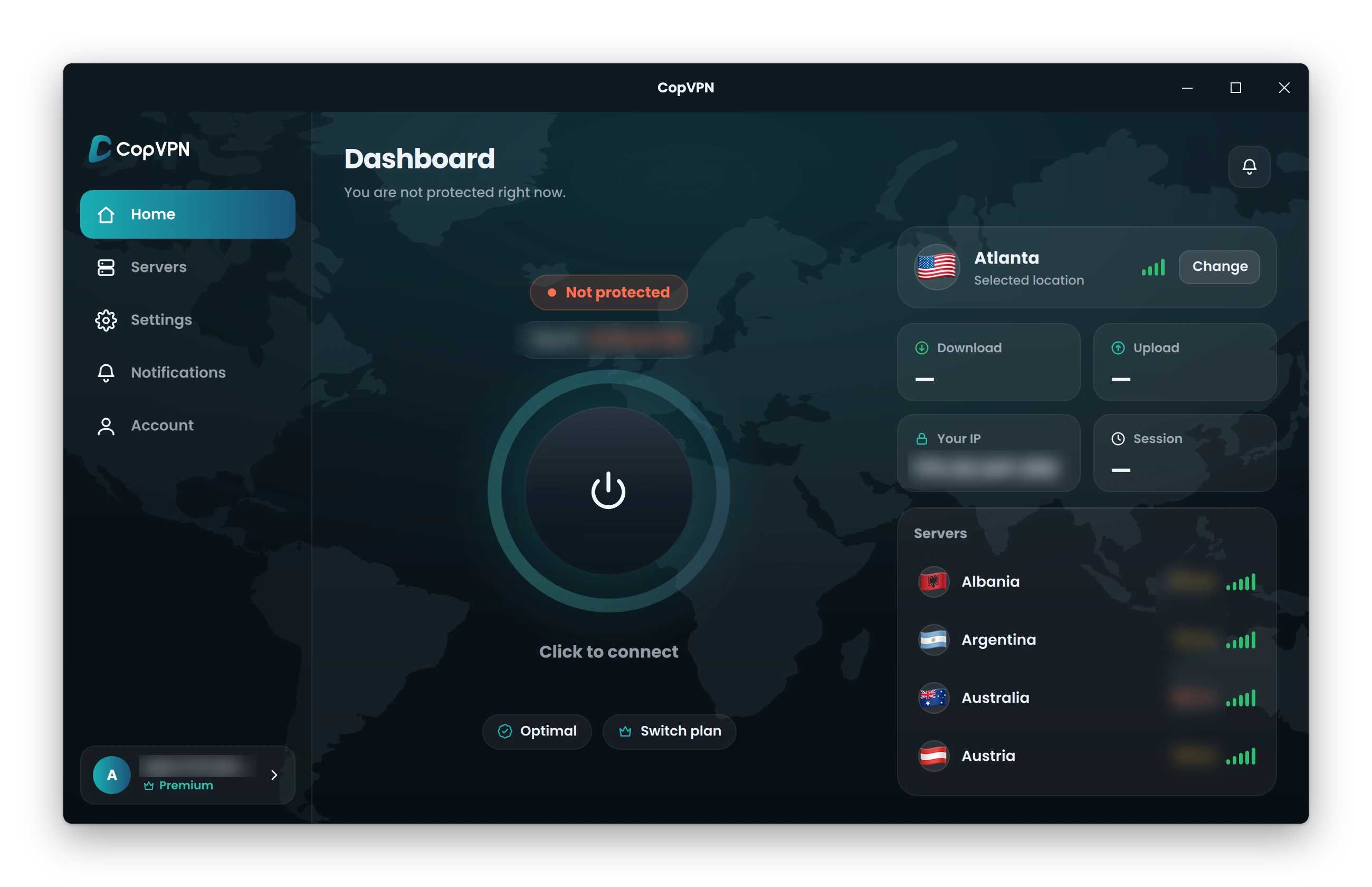
Home. Click the power button to connect. Optimal picks the protocol for you.
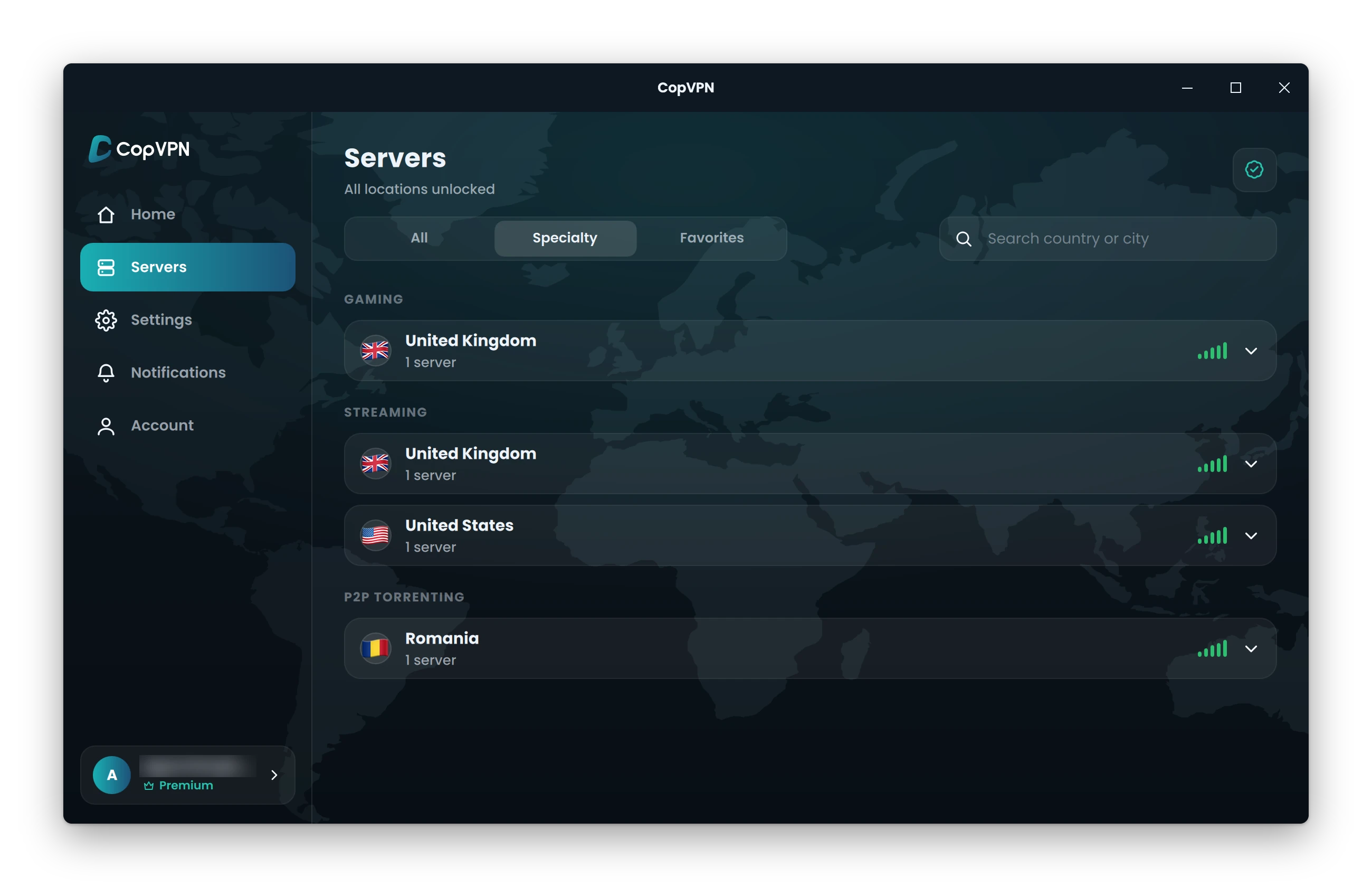
Servers › Specialty. Streaming, Gaming and P2P Torrenting groups, with a plan.
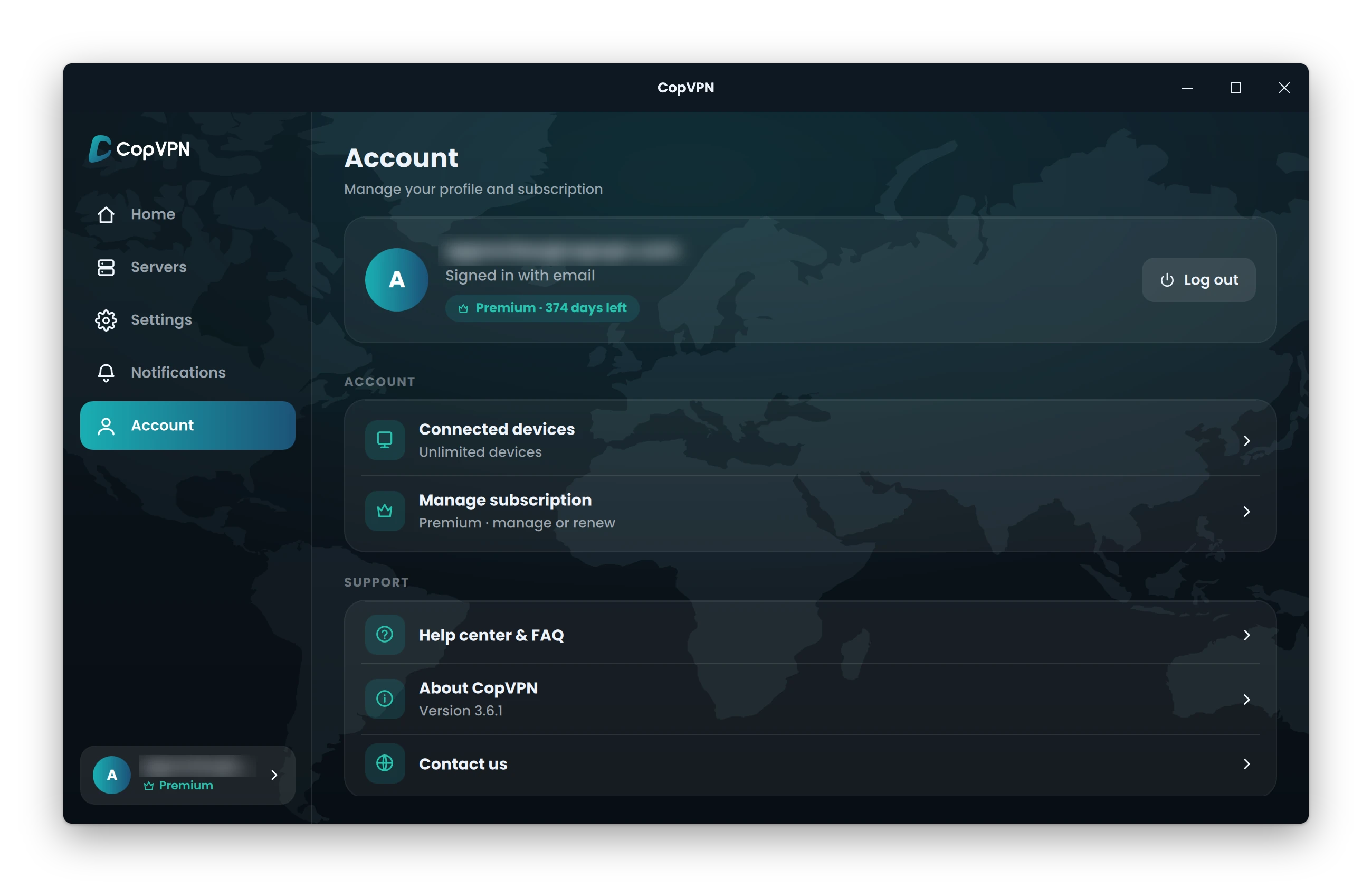
Account. Unlimited devices on one account.
What’s in the Windows app
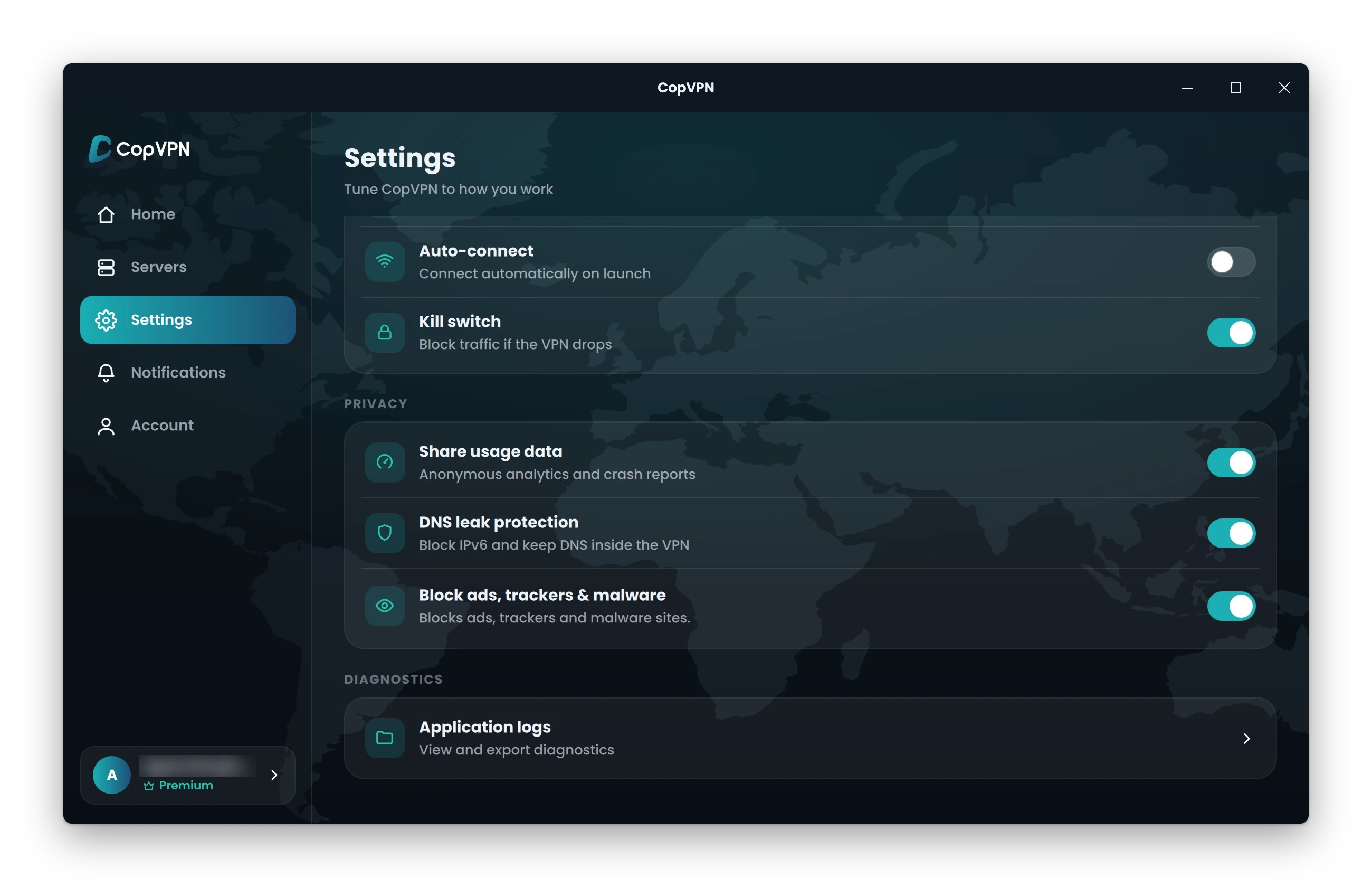
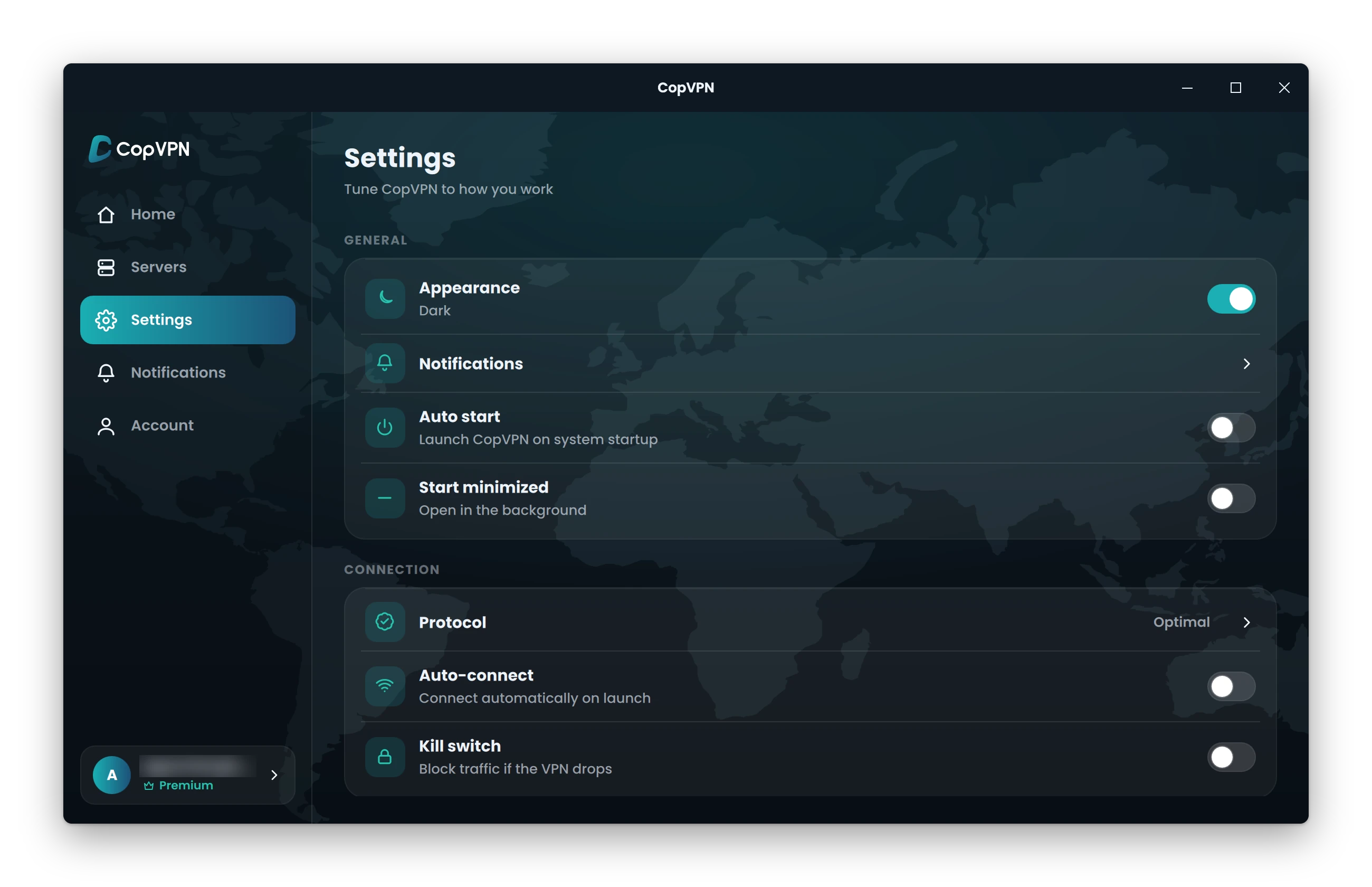
Every setting, by its real name
Pick a tile. The real Windows app shows where the setting lives, and the card says what it does.
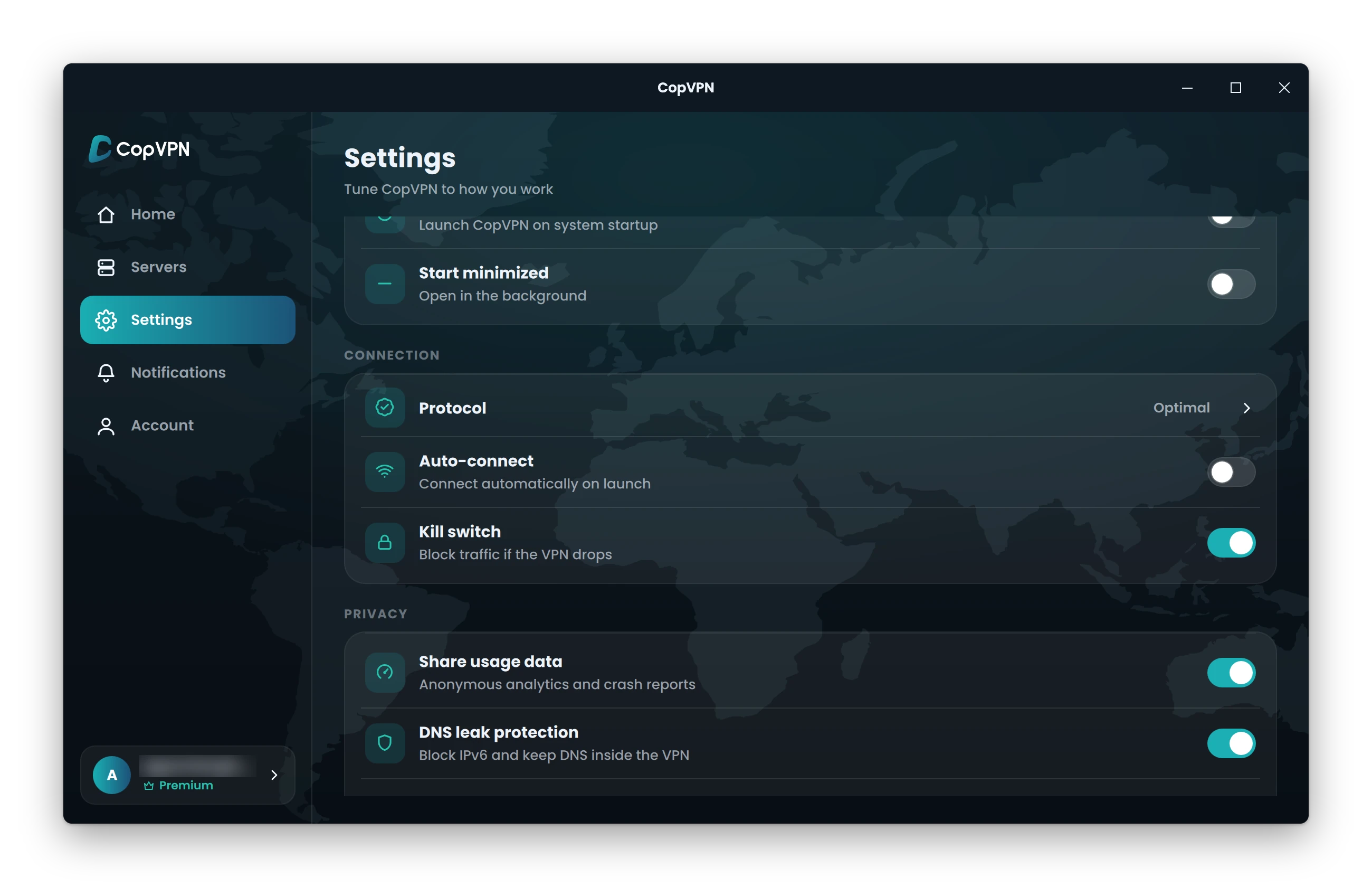
Kill switchBlock traffic if the VPN drops
Off until you turn it on
If the VPN connection drops, your PC’s traffic stops instead of leaving outside the tunnel. On Windows it works as a system firewall rule: the app uses Windows Filtering Platform filters.
How the kill switch worksDNS leak protectionBlock IPv6 and keep DNS inside the VPN
On by default
Your DNS lookups, how your PC finds a website’s address, stay inside the VPN, and IPv6 traffic is blocked.
More on DNS leaksBlock ads, trackers & malwareBlocks ads, trackers and malware sites.
You choose
Blocks known ad, tracking and malware sites on your PC, from one shared blocklist. It doesn’t scan files and isn’t antivirus.
Auto-connectConnect automatically on launch
You choose
CopVPN connects as soon as the app opens, so you don’t have to click the power button each time.
Auto startLaunch CopVPN on system startup
You choose
CopVPN opens when Windows starts. Turn on Auto-connect too, and your PC connects without you touching the app.
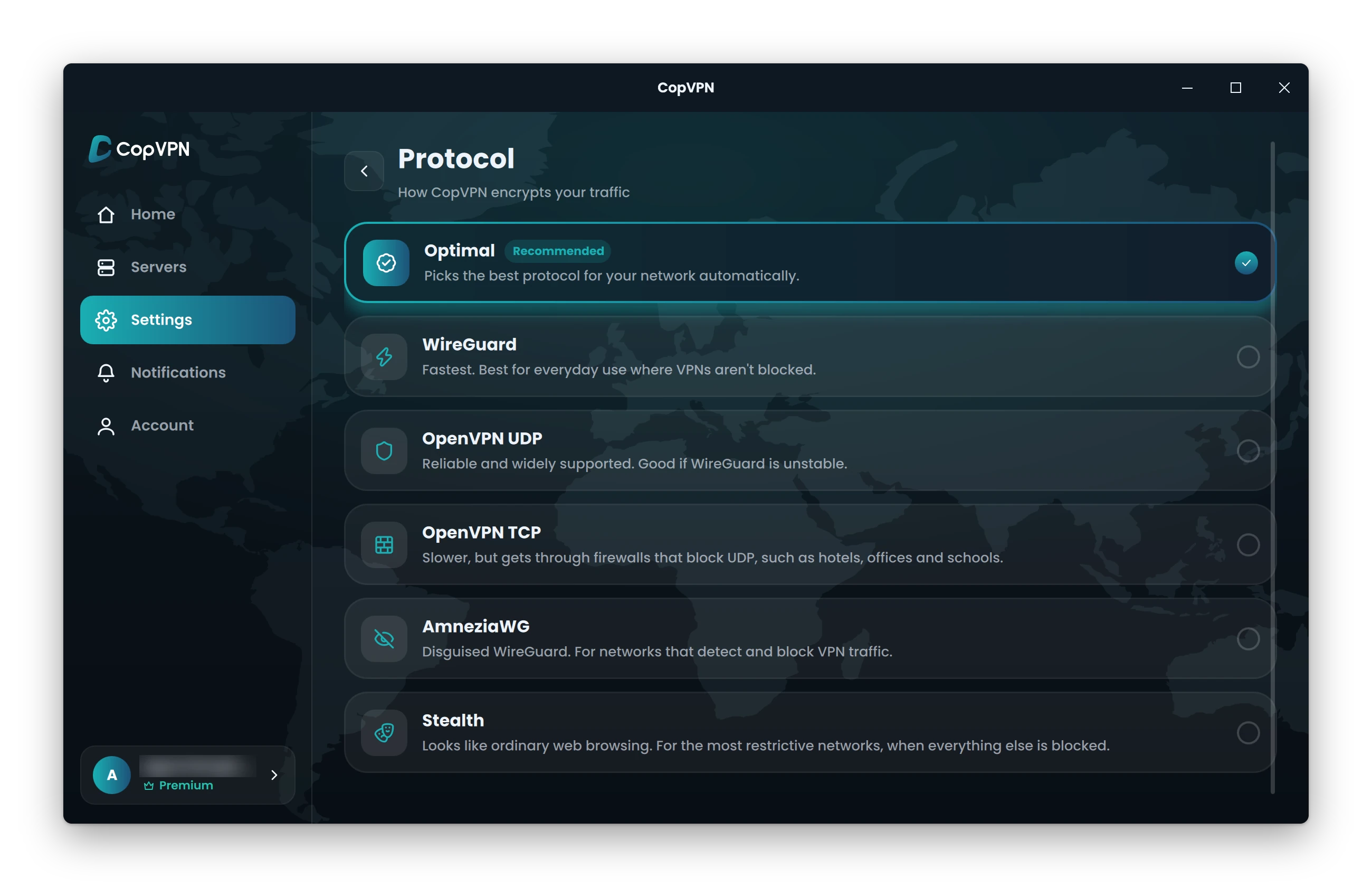
ProtocolHow CopVPN encrypts your traffic
5 protocols
Optimal picks one for you. Or choose any of the 5 protocols yourself, by name:
OptimalPicks the best protocol for your network automatically.
WireGuardFastest. Best for everyday use where VPNs aren’t blocked.
OpenVPN UDPReliable and widely supported. Good if WireGuard is unstable.
OpenVPN TCPSlower, but gets through firewalls that block UDP, such as hotels, offices and schools.
AmneziaWGDisguised WireGuard. For networks that detect and block VPN traffic.
StealthLooks like ordinary web browsing. For the most restrictive networks, when everything else is blocked.
Choose Optimal and Smart Connect tries another protocol by itself if one can’t connect.
Not in the Windows app: split tunneling. It’s in the Android app, and the browser extension has a “Bypass list”.
System requirements
Will CopVPN run on your PC?
CopVPN needs Windows 10 (version 1809 or later) or Windows 11, 64-bit. Answer three questions to check yours.
Windows
System type
CopVPN plan
Not sure? Open Settings › System › About on your PC. It shows your Windows version and system type.
Your PC
Ready for CopVPN
Your PC meets the requirements. Download the installer, run it, and sign in.
On an Arm PC, the x64 installer runs through Windows’ emulation.
Sign in with the account that has your plan. One plan unlocks every CopVPN app signed in with the same account.
Your PC
Update Windows first
CopVPN needs Windows 10 version 1809 or later, or Windows 11. Update Windows, then come back for the installer.
Your PC
This PC can’t run the Windows app
The CopVPN app for Windows needs Windows 10 (version 1809 or later) or Windows 11, on 64-bit Windows.
CopVPN also has apps for Mac, Linux, iPhone, iPad, Android and Android TV, and extensions for Edge, Chrome and Firefox.
Install
How to set up the Windows VPN app on your device
Four steps. The installer comes straight from download.copvpn.com.
CopVPN for Windowsdownload.copvpn.com
.exe installer · 64-bit · Latest version
Step 1 of 4
Download the installer
Click Download for Windows. You get the CopVPN installer, an .exe file from download.copvpn.com, for Windows 10 (version 1809 or later) and Windows 11, 64-bit.
Download for WindowsOpen the file → follow the installer → open CopVPN
Step 2 of 4
Run the installer
Open the file you downloaded and run the installer. When it’s done, open CopVPN.
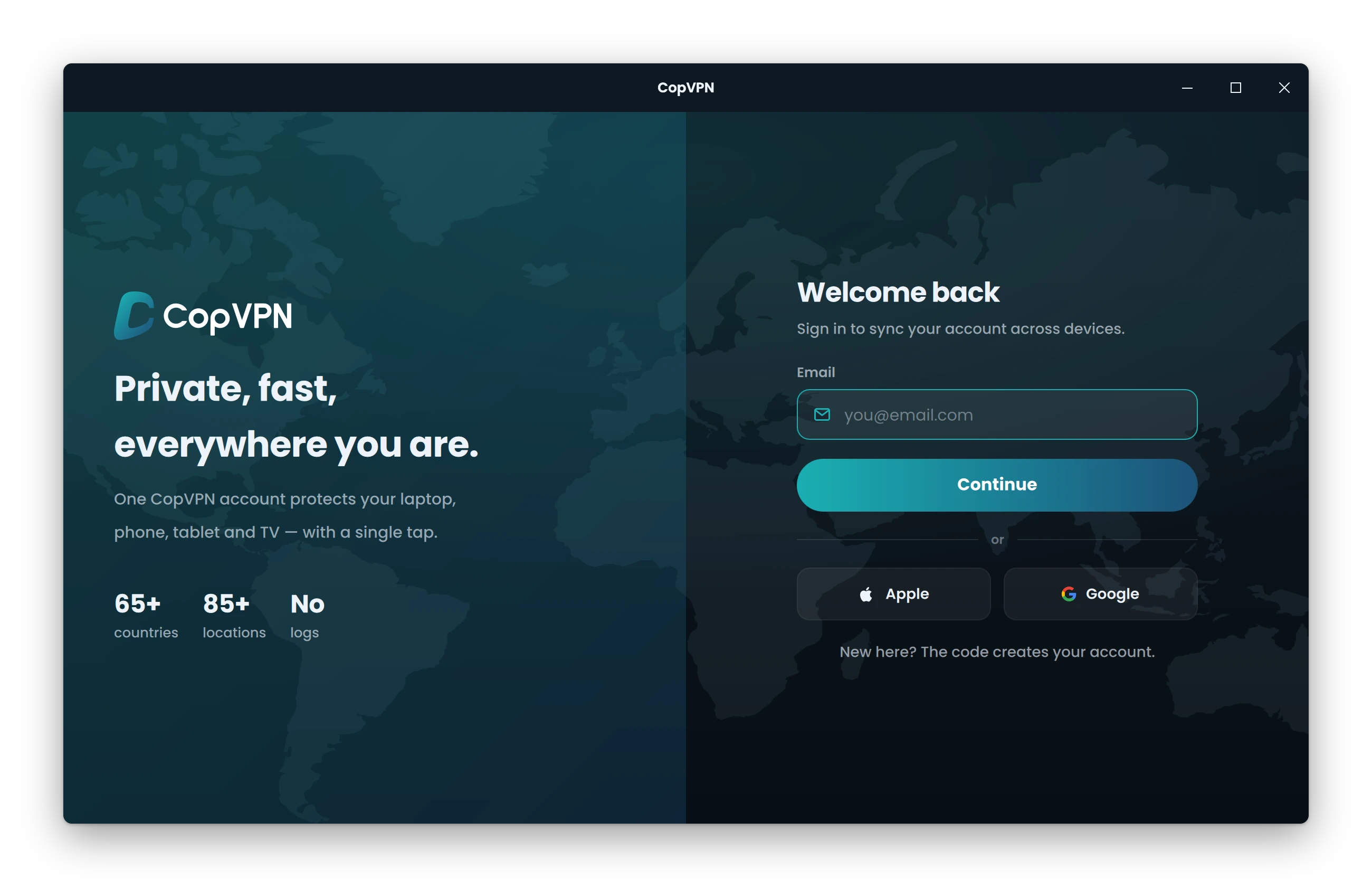
Step 3 of 4
Sign in, passwordless
Type your email and enter the 6-digit code, or continue with Apple or Google. There’s no password to create or remember.
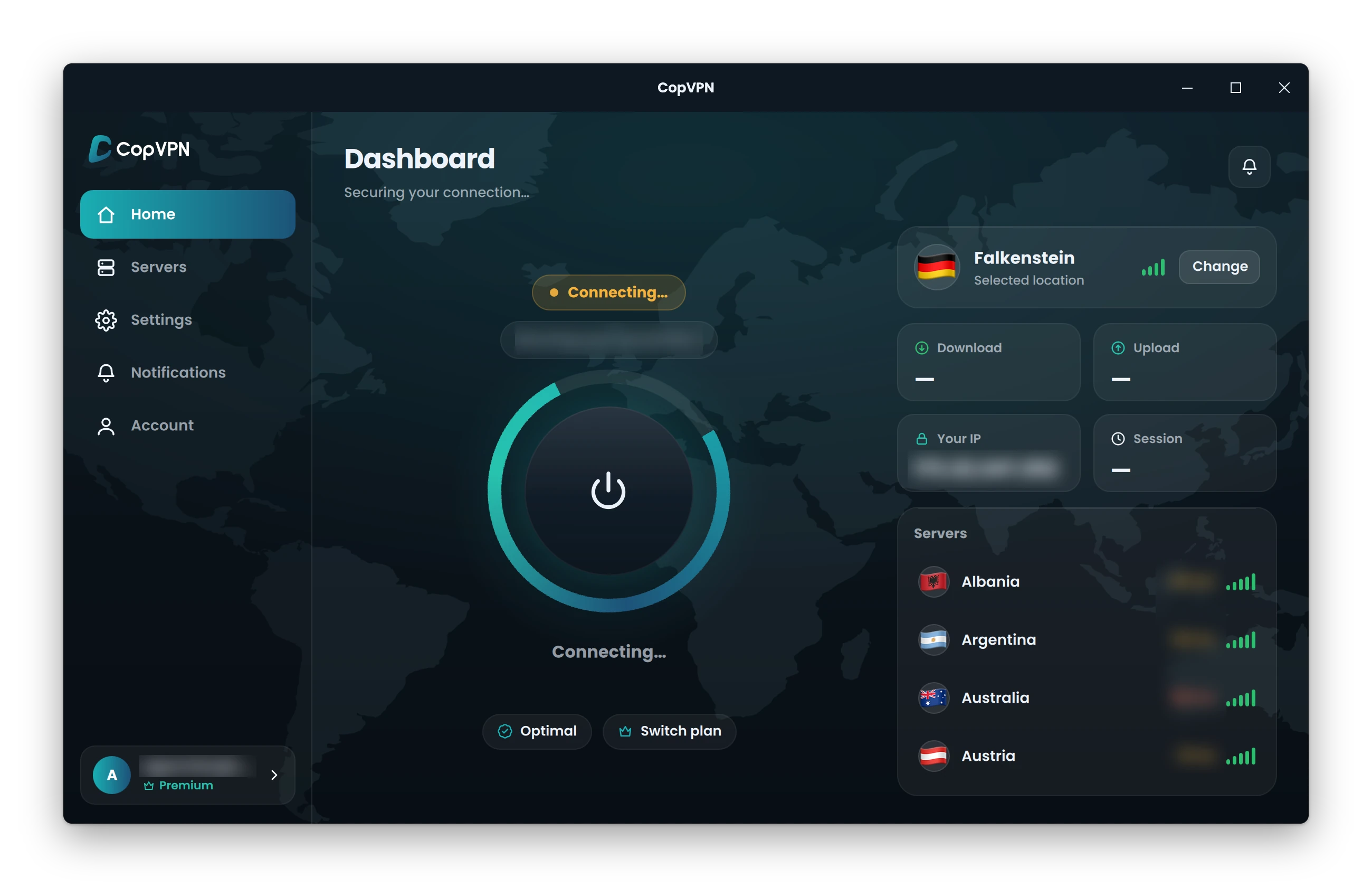
Step 4 of 4
Click to connect
Pick a location, or keep the selected one, and click the power button. No plan? Pick one of the free locations.
No plan yet? See plansOne account, every device
Your plan covers more than this PC
Unlimited devices. A plan bought at our checkout, in the App Store, the Mac App Store or Google Play unlocks every CopVPN app signed in with the same account.
- You’re hereWindowsWindows 10, 11
- MacMacBook, iMac
- LinuxDesktop app
- iPhone and iPadApp Store
- AndroidPhone, tablet
- Android TVTV app
- ChromeBrowser extension
- EdgeBrowser extension
- FirefoxBrowser extension
Every CopVPN app in one place: download CopVPN for all your devices.
Questions
Frequently asked questions
Our support team answers by email:
contact@copvpn.comWhich versions of Windows does CopVPN support?
Windows 10 (version 1809 or later) and Windows 11, 64-bit. The app is an .exe installer from download.copvpn.com.
Does CopVPN work on Windows on Arm?
Yes. The x64 installer also runs on Arm PCs through Windows’ emulation.
Is CopVPN in the Microsoft Store?
No. Download the installer (.exe) from this page. It comes from download.copvpn.com.
How does the kill switch work on Windows?
Turn on Kill switch, “Block traffic if the VPN drops”, in Settings. It’s off until you turn it on. On Windows it works as a system firewall rule: the app uses Windows Filtering Platform filters.
Does the Windows app have split tunneling?
No. Split tunneling is in the Android app, and the browser extension has a “Bypass list” of sites that skip the VPN.
Do I need a plan to use CopVPN on Windows?
No. Without a plan, the Windows app connects to the free locations. A plan opens all 85+ locations. There’s no free trial. A plan bought at our checkout, in the App Store, the Mac App Store or Google Play unlocks every CopVPN app signed in with the same account.
How do I sign in on Windows?
With your email and a 6-digit code, or with Apple or Google. CopVPN is passwordless, so there’s no password to create or remember.
How many devices can I use with CopVPN?
As many as you like. Install CopVPN on your phones, tablets, computers and Android TV, and sign in to each one with the same account.
Keep reading
Settings and protocols, explained
- FeatureKill switchWhat “Block traffic if the VPN drops” does, app by app.
- FeatureDNS leak protectionKeep your DNS lookups inside the VPN. On by default.
- ProtocolWireGuardFastest. Best for everyday use where VPNs aren’t blocked.
- ProtocolAmneziaWGDisguised WireGuard. For networks that detect and block VPN traffic.
Your connection right now
This is what websites see
Any site you open can read your IP address and roughly where you are. Connect CopVPN and they see one of our servers instead.
- Your IP
- Location
- Provider