Support
Contact CopVPN support
Contact CopVPN by email at contact@copvpn.com, for connection problems, billing, refunds and account questions. Many answers are one click away, so pick your route below first: you may not need to write at all.
Support address
It’s our only support address, for every question below.
- RefundsRequested in my.copaccount.com › Payment historyHow
- Account deletionOn request, through this pageHow
- From your dashboardThe Help link in my.copaccount.com opens our Contact pageStart
Find the right route
Three steps to the right answer
Pick what it’s about. Try the fix first, and if you still need us, the email is ready to write, with what to include.
Can’t connect
Sign in to the network, then switch protocol
If the network has its own sign-in page, such as hotel Wi-Fi, sign in there first. Then try OpenVPN TCP: “Slower, but gets through firewalls that block UDP, such as hotels, offices and schools.” If the connection keeps dropping, OpenVPN UDP is “Reliable and widely supported. Good if WireGuard is unstable.” Choose Optimal and Smart Connect tries another protocol by itself if one can’t connect.
My network blocks VPNs
Try a disguised protocol
AmneziaWG is “Disguised WireGuard. For networks that detect and block VPN traffic.” If that’s blocked too, Stealth “Looks like ordinary web browsing. For the most restrictive networks, when everything else is blocked.” Pick either one in the app’s protocol list.
Refunds & payments
Refunds are requested in your account
Sign in at my.copaccount.com and open Payment history. CopVPN comes with a 30-day money-back guarantee, and the Refund Policy has the full terms.
Sign-in & my account
Look for your 6-digit code
CopVPN is passwordless: you sign in with your email and a 6-digit code, or with Apple or Google. If a code hasn’t arrived, check your spam or junk folder and the address you typed. Don’t share your code with anyone.
Devices & my plan
How do I add CopVPN to another device?
Install CopVPN on the new device and sign in with the same email. Your account works on unlimited devices. Your plan and devices are in my.copaccount.com.
Is my connection private?
Check DNS stays inside the VPN
DNS leak protection, “Block IPv6 and keep DNS inside the VPN”, is on by default in the CopVPN apps. The DNS leak test page has a step-by-step checklist for checking your setup.
Delete my account
Ask us here
You can delete your account in the Android app (My Account › Delete Account) or in the iPhone and iPad app. Or ask through this page: email contact@copvpn.com from the address on your account and say you want it deleted.
Before I buy
Most answers are in the FAQs
There’s no free trial, but every CopVPN app connects to the free locations without a plan. Every plan opens all 85+ locations in 65+ countries, on unlimited devices, and CopVPN comes with a 30-day money-back guarantee.
Partners & affiliates
Start with the Affiliate program
The Affiliate program page explains how the program works. Partners sign in to the affiliate portal at partners.copvpn.com.
- Subject
- Can’t connect
Include
- Your device, the CopVPN app and its version
- The network you’re on: home, hotel, office or mobile data
- The protocols and locations you tried
- Subject
- My network blocks VPNs
Include
- Your device, the CopVPN app and its version
- Which protocols you tried, and what happened with each
- Any message the app showed, word for word
- Subject
- A question about a payment
Include
- The email address on your account
- The date of the payment and the plan
- What you’d like to know
- Subject
- Sign-in help
Include
- The email address you sign in with
- How you sign in: email code, Apple or Google
- What you see when you try
- Subject
- My devices and plan
Include
- The email address on your account
- The devices you use CopVPN on
- What you’re trying to do
- Subject
- A privacy or DNS question
Include
- Your device, the CopVPN app and its version
- What you checked, and what it showed
- Whether CopVPN was connected at the time
- Subject
- Delete my account
Include
- Send it from the email address on your account
- Say that you want the account deleted
- Anything you’d like us to know first
- Subject
- A question before I buy
Include
- The devices you’d use CopVPN on
- The plan you’re looking at
- Your question, in full
- Subject
- Affiliate program
Include
- Your site, channel or audience
- Your partner account email, if you have one
- What you’re asking about
Write from the email address on your account, so we can find it. Never include a sign-in code or card number.
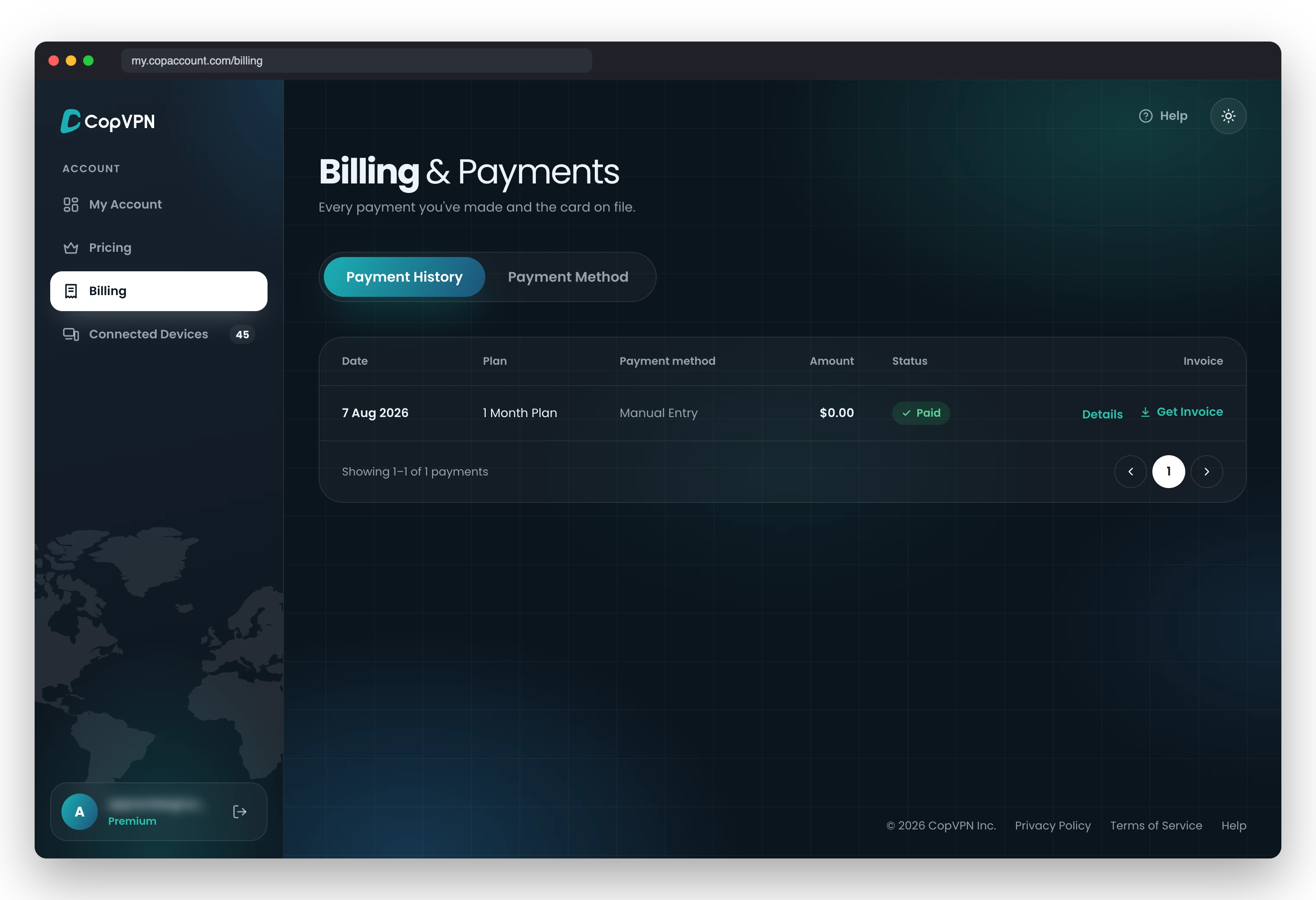
Payment HistoryRefund requests are made here
HelpOpens this page
Refunds and payments
Refunds are requested in your account
No email needed: refund requests are made in my.copaccount.com, in Payment history.
- Sign in at my.copaccount.com with your email and a 6-digit code, or with Apple or Google.
- Open Billing, then the Payment History tab, and make your request there.
The 30-day money-back guarantee covers
- Payments made through our checkout
- Within 30 days of that payment
- Every plan length
- One request per payment
It doesn’t cover
- App Store and Google Play purchases: the store refunds them
- Payments more than 30 days old
Before you write
Frequently asked questions
Six answers that save an email. The CopVPN FAQs have the rest, searchable by keyword.
Where do I request a refund?
In your account: sign in at my.copaccount.com and open Payment history. Refund requests are made there, for payments the 30-day money-back guarantee covers.
CopVPN won’t connect on hotel, school or office Wi-Fi.
If the network has its own sign-in page, sign in there first, then connect. If it still won’t connect, switch protocol to OpenVPN TCP: “Slower, but gets through firewalls that block UDP, such as hotels, offices and schools.” Choose Optimal and Smart Connect tries another protocol by itself if one can’t connect.
What if my network blocks VPNs?
Try AmneziaWG: “Disguised WireGuard. For networks that detect and block VPN traffic.” If that’s blocked too, try Stealth: “Looks like ordinary web browsing. For the most restrictive networks, when everything else is blocked.”
My sign-in code hasn’t arrived. What can I do?
Check your spam or junk folder, and make sure you typed the email address on your account. If it still doesn’t arrive, email contact@copvpn.com from that address. Don’t share your code with anyone.
How many devices can I use with CopVPN?
As many as you like. Install CopVPN on your phones, tablets, computers and Android TV, and sign in to each one with the same account.
How do I delete my CopVPN account?
In the Android app, open My Account and choose Delete Account. The iPhone and iPad app lets you delete your account too. Or ask us through the Contact page: email contact@copvpn.com from the address on your account.
Your connection right now
This is what websites see
Any site you open can read your IP address and roughly where you are. Connect CopVPN and they see one of our servers instead.
- Your IP
- Location
- Provider