Use case · Streaming
A VPN for streaming, with its own server group
Want a VPN for streaming? CopVPN is a streaming VPN with Streaming servers in the Specialty tab of its apps, so they’re easy to find when you sit down to watch. They come with every CopVPN plan.
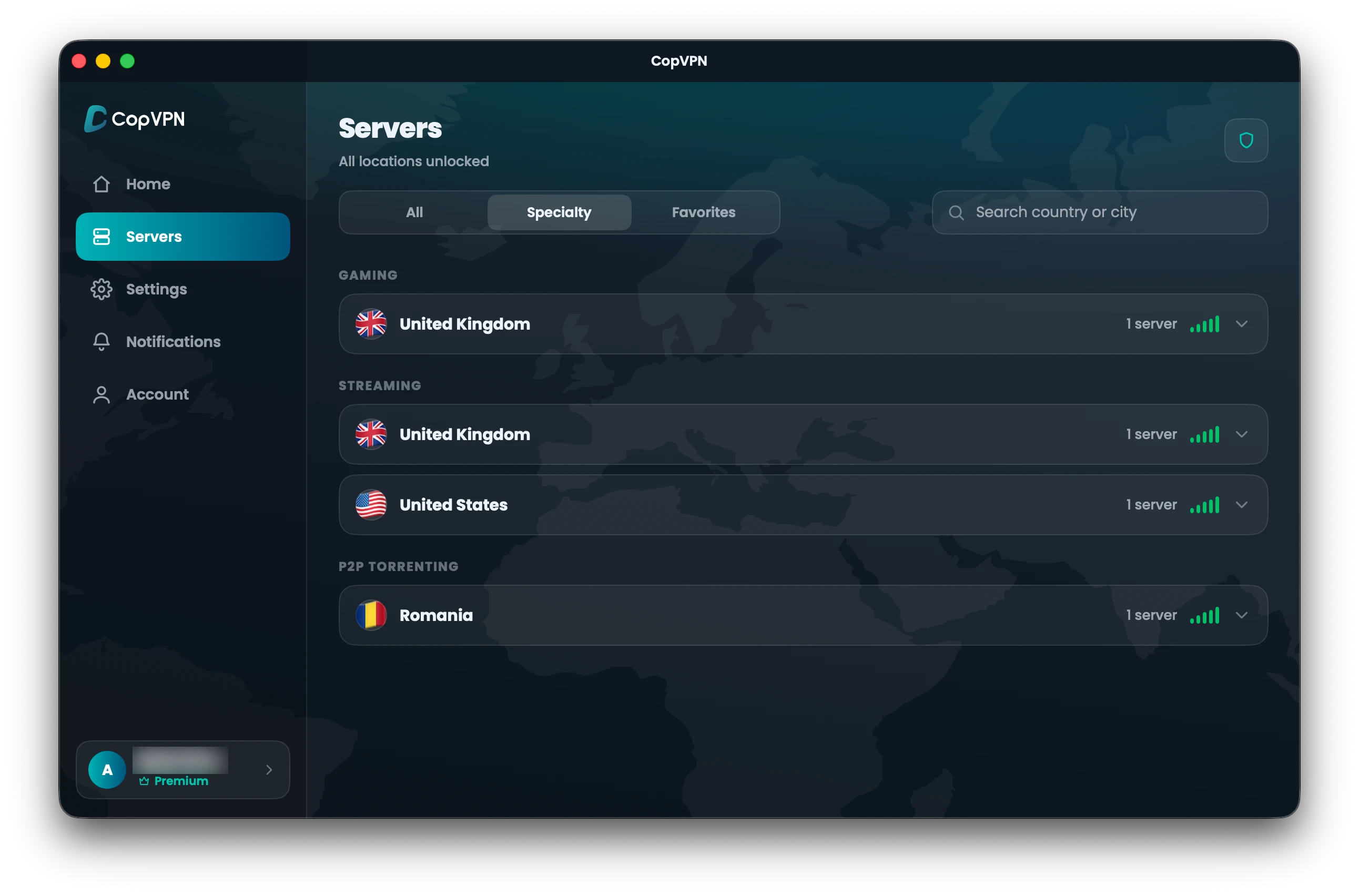
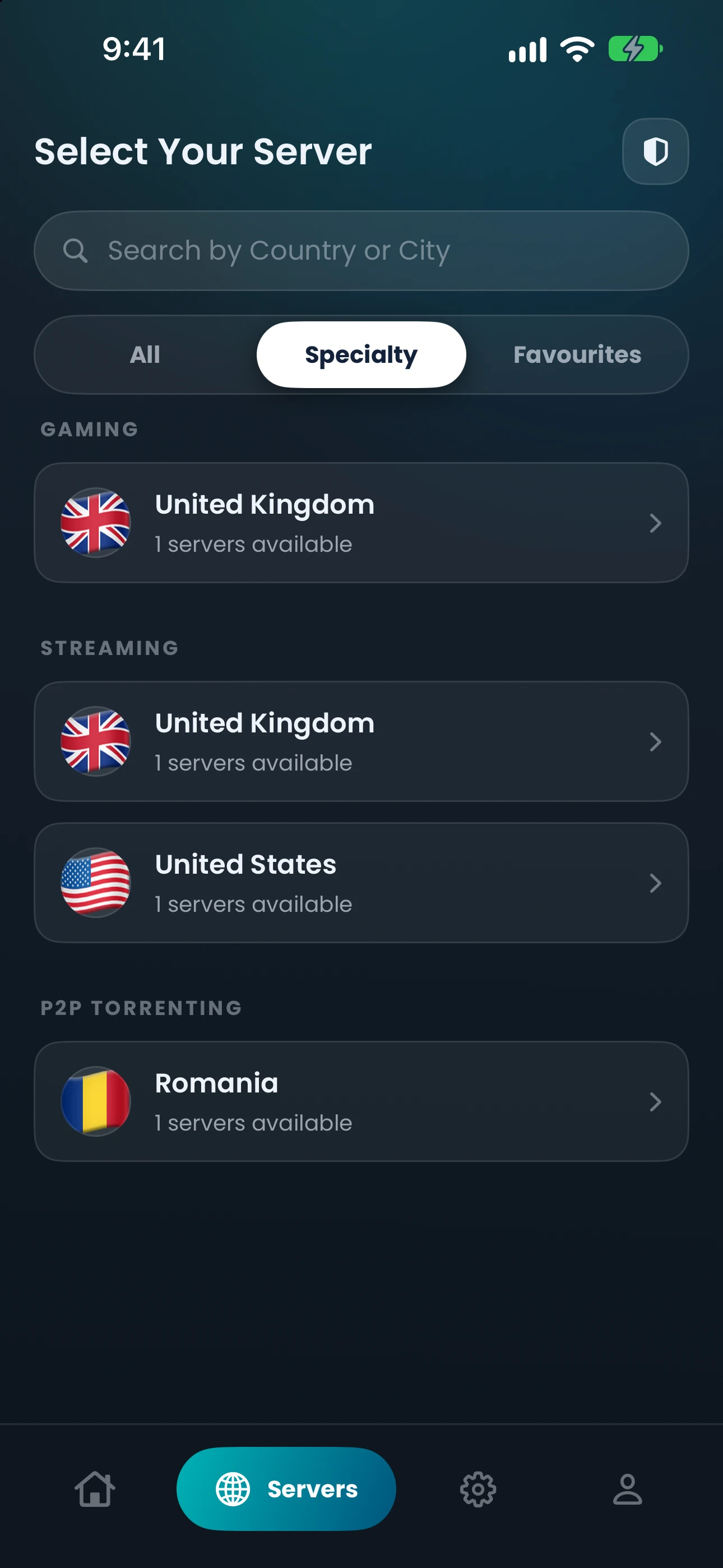
- In the Specialty tab, from the live server list.
- Comes with every CopVPN plan.
- Unlimited devices on one account.
Specialty servers
What the Streaming servers are
CopVPN’s Streaming servers sit in the Specialty tab of the CopVPN apps for Windows, Linux, Mac, iPhone, iPad, Android and Android TV, set aside for streaming, next to two other groups: Gaming and P2P Torrenting.
The Specialty tab lists them straight from our live server list, so it shows what’s available now. Outside the Specialty tab, a plan opens all 85+ locations in 65+ countries in our VPN server list.
Like every CopVPN connection, a Streaming server keeps your traffic in an encrypted tunnel. Your internet provider sees an encrypted connection to the server, not the sites you visit, which is handy when you’re watching on hotel or café Wi-Fi.
Three groups, one tab
Real screen · CopVPN for iPhone · Servers › Specialty
Protocols
Which protocol for streaming? Where are you watching?
Pick where you’re watching tonight, and we’ll show you the protocol to choose, in the app’s own words.
Choose this protocol
WireGuard
“Fastest. Best for everyday use where VPNs aren’t blocked.”
For streaming at home, or on any network that doesn’t block VPNs, choose WireGuard.
Settings › Protocol in every CopVPN app
You can read more about WireGuard VPN in CopVPN, including what to switch to if a network gets in the way.
How to connect
Connect in three steps
- 01
Open the Specialty tab
In the CopVPN app for Windows, Linux, Mac, iPhone, iPad, Android or Android TV, open the Specialty tab.
- 02
Pick Streaming and a country
Choose the Streaming group, then a country from the list.
- 03
Connect
Tap or click connect, and start watching over an encrypted connection.
Devices
Streaming on your phone, tablet and computer
Need a VPN for watching videos on your phone, computer and tablet? CopVPN gives you unlimited devices. Watch on your laptop, carry on from your phone, and keep your tablet signed in for later.
The Streaming servers are in the apps for Windows, Linux, Mac, iPhone, iPad, Android and Android TV. Download CopVPN for each of your devices.
Play as well as watch? The Specialty tab also has servers for gaming with a VPN.
Questions
Frequently asked questions
Our support team answers by email:
contact@copvpn.comWhat are CopVPN’s Streaming servers?
They’re the servers listed under Streaming in the Specialty tab of the CopVPN apps for Windows, Linux, Mac, iPhone, iPad, Android and Android TV. The same tab has a Gaming group and a P2P Torrenting group.
Do I need a plan for Streaming servers?
Yes. The Specialty groups, Streaming included, come with every CopVPN plan. Each plan has a 30-day money-back guarantee.
Which countries have Streaming servers?
Today there are Streaming servers in the UK and the US. The list can change, and the Specialty tab in the app always shows the current countries, straight from our live server list.
Which protocol should I use for streaming?
WireGuard, described in the app as “Fastest. Best for everyday use where VPNs aren’t blocked.” If you’d rather not choose, leave the app on Optimal and it picks one for your network.
How many devices can I use?
As many as you like. Install CopVPN on your phones, tablets, computers and Android TV, and sign in to each one with the same account.
Keep reading
Related pages and guides
Your connection right now
This is what websites see
Any site you open can read your IP address and roughly where you are. Connect CopVPN and they see one of our servers instead.
- Your IP
- Location
- Provider