Browser extension · Microsoft Edge Add-ons
Download a VPN extension for Microsoft Edge
The CopVPN extension for Microsoft Edge protects your browser in one click: what you do in Edge is encrypted between your browser and CopVPN. Handy on a shared computer. To protect the whole device, install the full app.
- Microsoft Edge 116 or later
- Free locations without a plan
- Protects this browser only
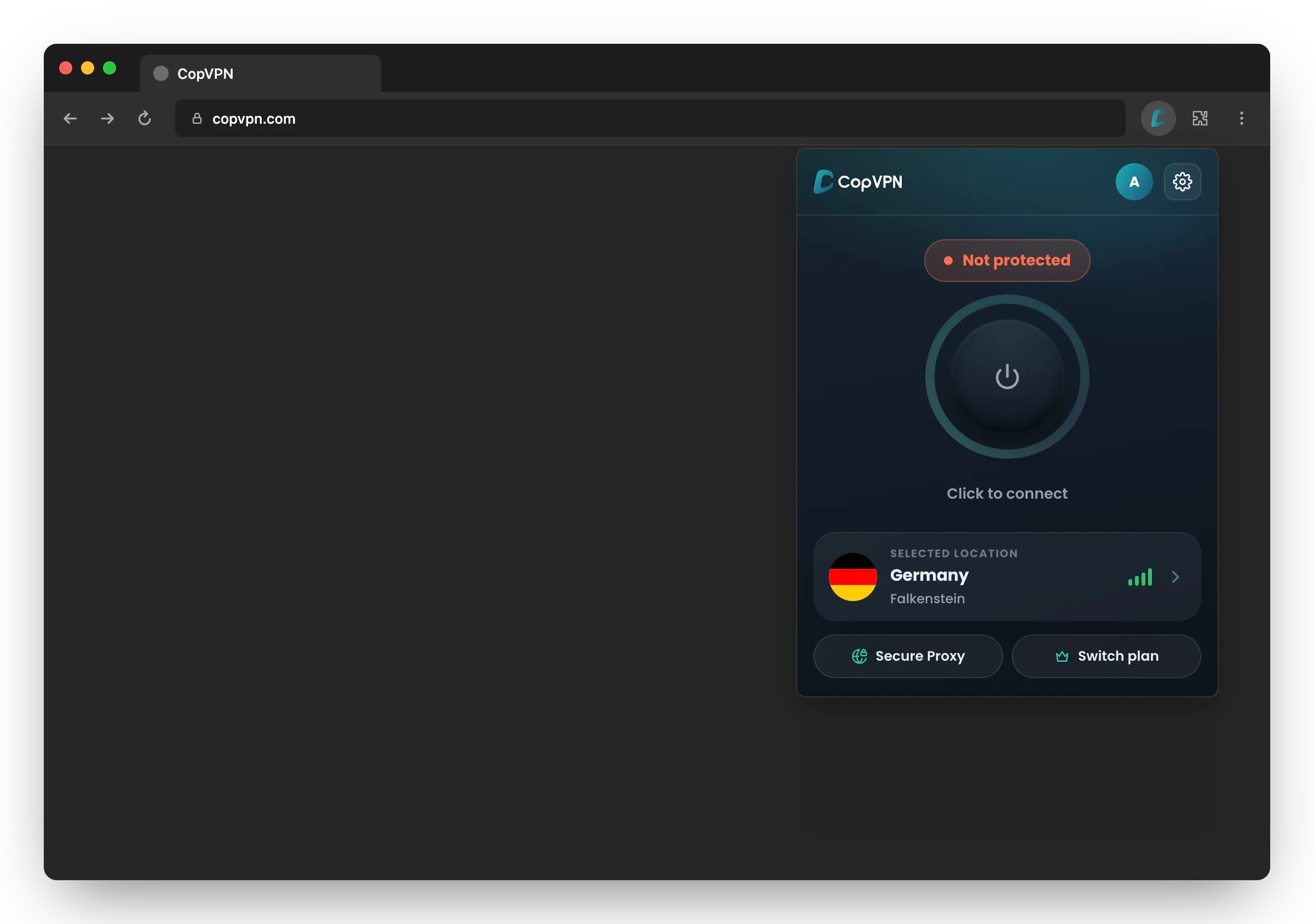
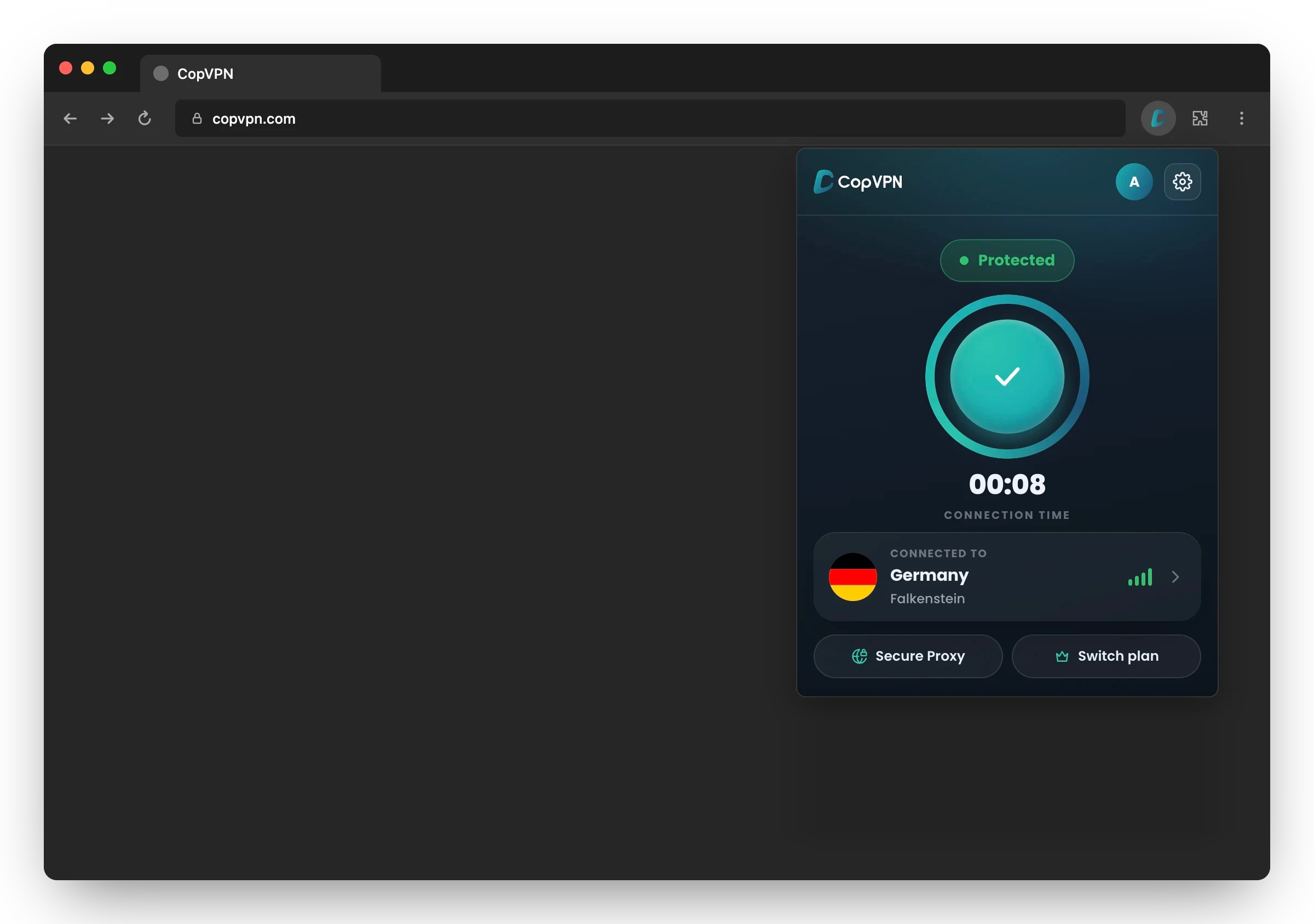
Try it: click the button in the popup.
Extension or full app?
Protection that stops at the edge of your browser
The extension covers Microsoft Edge and nothing else: other browsers and apps on the computer connect directly. Switch to the full app to see the difference.
This computer
- Microsoft EdgeThrough CopVPNDirect
- Another browserThrough CopVPNDirect
- Mail appThrough CopVPNDirect
- A gameThrough CopVPNDirect
- Chat and callsThrough CopVPNDirect
- File syncThrough CopVPNDirect
CopVPN for Edge: only Microsoft Edge goes through CopVPN. Everything else connects directly.
CopVPN for Edge
Choose the extension when…
- You only need Microsoft Edge protected
- You’re on a shared computer
- You want some sites to skip the VPN, with the Bypass list
- You’d like to start without a plan, on the free locations
The full app
Choose the full app when…
- You want the whole device protected, not just the browser
- You want 5 protocols to choose from
- You want DNS leak protection: “Block IPv6 and keep DNS inside the VPN”, on by default
- You want the Specialty tab: Streaming, Gaming and P2P Torrenting servers, with a plan
Every CopVPN app connects to the free locations without a plan.
Pinned to Edge’s toolbar
Click a row. Read what it does.
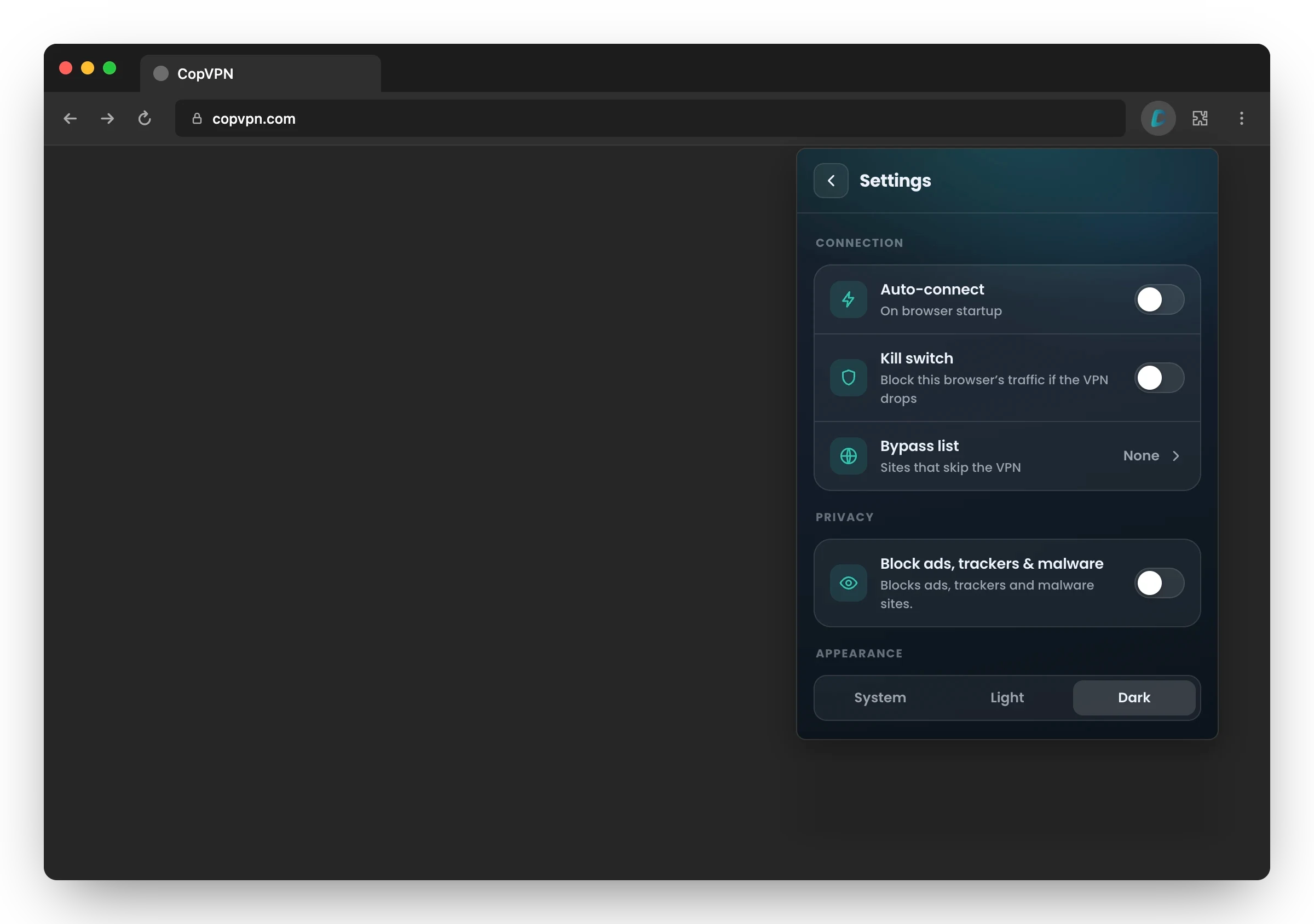
This is the extension’s real Settings screen, one click from Edge’s toolbar. The names are exactly as the extension shows them.
Built in, no switch needed
- Encrypted between your browser and CopVPN
- WebRTC leak protection while you’re connected
- Secure Proxy: one protocol, no picker
- Favourites in Locations
Ringed: the CopVPN button in Edge’s toolbar
1You choose
Auto-connect
“On browser startup”
Turn it on and CopVPN connects when Edge starts: to your last location or the fastest one, your choice.
2Off until you turn it on
Kill switch
“Block this browser’s traffic if the VPN drops”
If the connection to CopVPN drops, the extension blocks Edge’s traffic instead of letting it go out unprotected. It covers this browser only.
3Up to 100 sites
Bypass list
“Sites that skip the VPN”
Add up to 100 sites that open without the VPN. Subdomains are included, so one entry covers the whole site.
These skip the VPN, for example:
- example.com
- mail.example.com
- shop.example.com
4You choose
Block ads, trackers & malware
“Blocks ads, trackers and malware sites.”
Blocks known ad, tracking and malware sites in Edge. It works whether or not you’re connected. It blocks sites; it isn’t antivirus.
How the CopVPN ad blocker works5Your pick
Appearance
“System, Light or Dark”
The popup follows your system, or stays light or dark.
Install
From Edge Add-ons to Protected in four steps
No installer to run: the extension lives in Edge.
1Add it
On the CopVPN listing, click
GetThen pin CopVPN from Edge’s Extensions menu, so it sits in the toolbar:
Get it from Microsoft Edge Add-ons
Open the CopVPN listing on Microsoft Edge Add-ons and click “Get”. You need Microsoft Edge 116 or later.
2Sign in
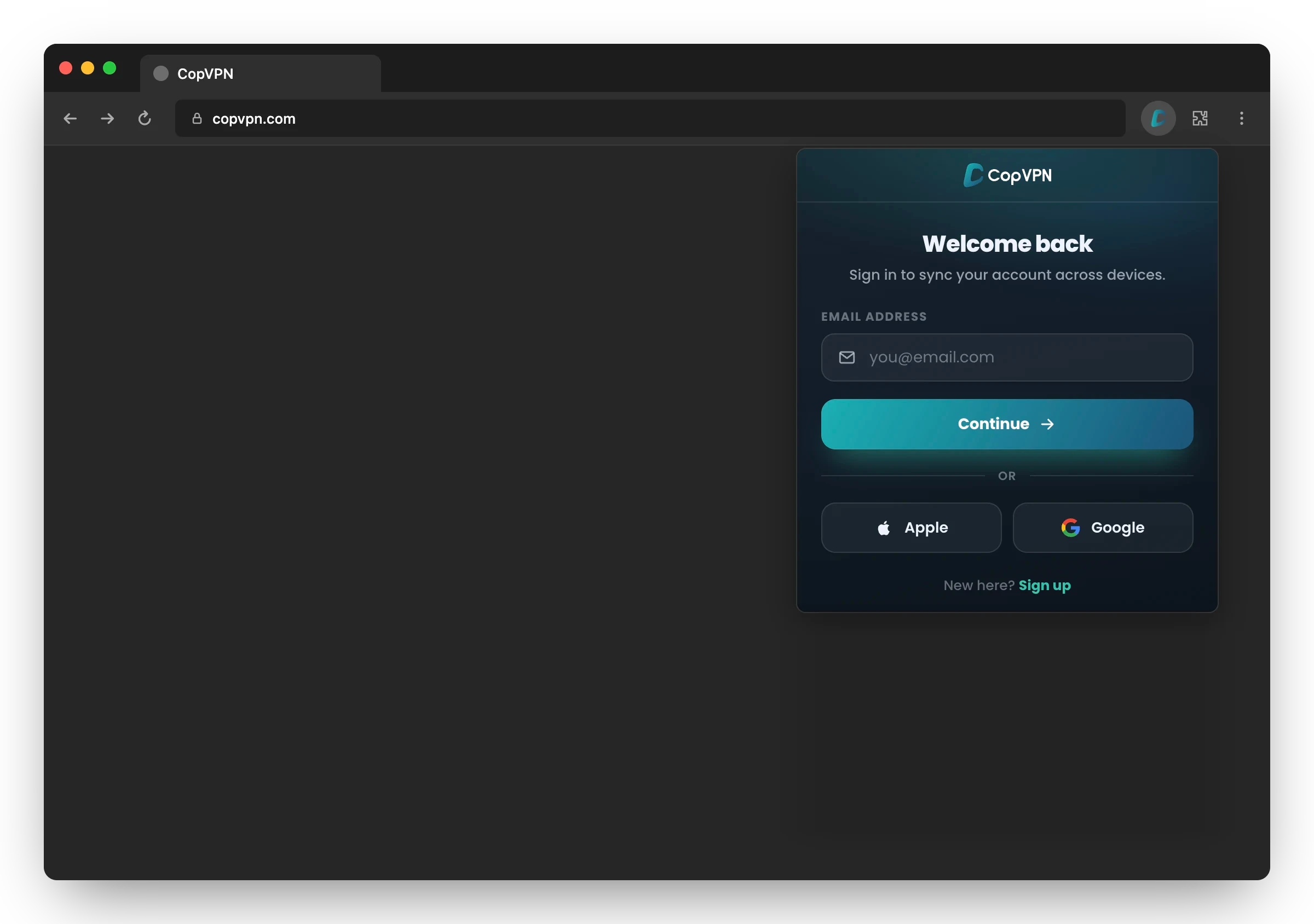
Sign in, passwordless
Use your email and a 6-digit code, or Apple or Google. New here? Sign up the same way.
3Connect
Click to connect
Keep the location shown or pick another, then click the button. No plan? Use the free locations.
4Protected
Edge is protected
The badge turns to Protected. Edge’s traffic is now encrypted between your browser and CopVPN.
Microsoft Edge 116 or later · Free locations without a plan
Free or with a plan
Start on the free locations. A plan opens every location.
Without a plan
- The free locations
With a plan
- Every location: 85+ locations in 65+ countries
- Every CopVPN app on the same account
- Plans from 1 month to 5 years
Sign in with the same account on your other browsers and devices.
- You’re hereEdgeBrowser extension
- WindowsWindows 10, 11
- MacMacBook, iMac
- LinuxDesktop app
- iPhone and iPadApp Store
- AndroidPhone, tablet
- Android TVTV app
- ChromeBrowser extension
- FirefoxBrowser extension
Questions
Frequently asked questions
Our support team answers by email:
contact@copvpn.comCan I use the CopVPN Edge extension without a plan?
Yes. Without a plan, the extension connects to the free locations. A plan opens every location, 85+ locations in 65+ countries, and every CopVPN app on the same account.
Does the Edge extension protect my whole computer?
No. It protects Microsoft Edge only: this browser’s traffic is encrypted between your browser and CopVPN. Other browsers and apps on the computer aren’t covered. To protect the whole device, install the CopVPN app for Windows, Mac or Linux.
Which version of Microsoft Edge do I need?
Microsoft Edge 116 or later. Get the extension from Microsoft Edge Add-ons, then pin it to the toolbar so it’s one click away.
How do I sign in to the Edge extension?
CopVPN sign-in is passwordless: use your email and a 6-digit code, or Apple or Google. You can sign in on unlimited devices.
Does the Edge extension have a kill switch?
Yes, for this browser. Turn on “Kill switch”: “Block this browser’s traffic if the VPN drops”. It’s off until you turn it on, and it covers Edge only.
Can I keep some sites off the VPN?
Yes. Add them to the “Bypass list”, “Sites that skip the VPN”. It holds up to 100 sites, and subdomains are included.
Can I choose a protocol in the extension?
No. The extension has one protocol, Secure Proxy, with no picker. The CopVPN apps for Windows, Mac, Linux, iPhone, iPad, Android and Android TV have 5 protocols to choose from.
Can the extension connect when Edge starts?
Yes. Turn on “Auto-connect” (“On browser startup”), and the extension connects to your last location or the fastest one, your choice.
Your connection right now
This is what websites see
Any site you open can read your IP address and roughly where you are. Connect CopVPN and they see one of our servers instead.
- Your IP
- Location
- Provider