How Does a VPN Work? Advantages, Drawbacks, and When You Need One

September 30, 2026
By Neo
You connect to public Wi-Fi, check your email, and pay for something online. Who else can see that traffic? Without a VPN, more people than you’d expect can see it. Here’s how a VPN works, what it really protects, and the trade-offs worth knowing before you use one.
What is a VPN?
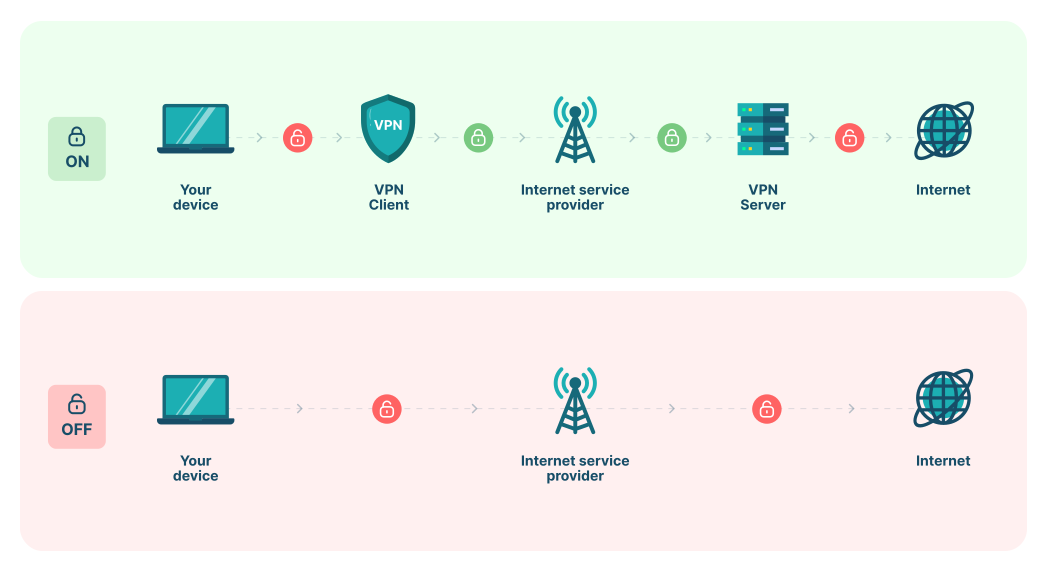
A VPN (virtual private network) encrypts your whole internet traffic and routes it through a remote server run by the VPN provider. Your internet provider and the network you’re on can’t read that traffic, and the websites you visit see the VPN server’s IP address instead of yours.
How does a VPN work? Step by step
- You connect. Open the VPN app and choose your server location. The app verifies your account and agrees on encryption keys with that server using a VPN protocol.
- A secure tunnel is created. Your device and the VPN server set up an encrypted connection, called a tunnel, over your normal internet connection.
- Your traffic is encrypted. Before anything leaves your device, including web requests, app data, and DNS lookups, the VPN app encrypts it. Anyone watching the network sees only scrambled data heading to one server.
- The VPN server forwards your request. The server decrypts your request and sends it to the website. The site sees the server’s IP address and location, not yours.
- The response comes back through the tunnel. The website replies to the VPN server, which encrypts the response and sends it to you.
- Your device decrypts it. The VPN app unlocks the data, and the page loads as normal.
The result: your ISP can see that you’re connected to a VPN and how much data you use, but not which sites you visit or what you do there.
VPN protocols explained
A VPN protocol is the set of rules your app and the server use to build the tunnel. It decides how fast and how secure your connection is.
| Protocol | Status | Best for |
|---|---|---|
| WireGuard | Modern default | Speed, fast reconnects, battery life on mobile |
| OpenVPN | Mature, widely audited | Compatibility and getting through restrictive networks |
| IKEv2/IPsec | Modern | Phones that switch between Wi-Fi and mobile data |
| L2TP/IPsec | Legacy | Older devices only |
| PPTP | Obsolete and insecure | Avoid |
Most reputable VPNs encrypt traffic with AES-256 or ChaCha20, ciphers considered unbreakable with today’s computers. Some providers have also started adding post-quantum key exchange, which protects today’s traffic against future quantum computers.
What a VPN does and doesn’t protect
A VPN makes you more private online, not invisible. Knowing the difference helps you use it well.
| A VPN protects | A VPN doesn’t protect |
|---|---|
| Your browsing from your ISP and network owner | You from tracking cookies and logged-in accounts |
| Your real IP address and approximate location | You from browser fingerprinting |
| Your DNS lookups (with leak protection) | You from malware, phishing, or scam sites |
| Your traffic on public and shared Wi-Fi | Your data once a website has it |
For stronger privacy, pair a VPN with a privacy-focused browser, blocked third-party cookies, and good password habits.

8 benefits of using a VPN
1. Enhanced Privacy and Anonymity Online
Your internet provider can normally see every site you visit. With a VPN, it sees only an encrypted connection to one server. The same applies to your employer’s, school’s, or hotel’s network.
2. Increased Security on Public Wi-Fi Networks
Most websites already use HTTPS, but public Wi-Fi still carries risks: fake hotspots, DNS snooping, and apps that don’t encrypt properly. A VPN encrypts everything from your device, closing those gaps at cafes, airports, and hotels.
3. Bypassing Geographical Restrictions and Censorship
In places where news sites, messaging apps, or social platforms are blocked, a VPN can restore access. Where VPNs are restricted by law, check local rules first.
4. Secure Data Transmission for Remote Work
A VPN encrypts the connection between remote workers and company systems. It keeps business data private on home and public networks.
5. Avoiding Bandwidth Throttling
Some ISPs slow down specific activities, such as streaming or file sharing. Because a VPN hides what you’re doing, it can prevent throttling that targets particular sites or services.
6. Safe Online Gaming
Hiding your IP address protects you from DDoS attacks by other players who try to knock your connection offline. A nearby server can keep that protection without a big latency hit.
7. Enhanced Online Shopping Security
A VPN can provide an extra layer of security when shopping online, especially on international websites. It helps in protecting your payment details and personal information from potential interceptors. Moreover, VPNs can sometimes help in bypassing regional price discrimination. Surprisingly, they can let you access better deals in other countries.
8. Protection Against Cyberstalking and Harassment
By masking your IP address and encrypting your internet traffic, VPNs can provide a significant barrier against cyberstalkers and online harassers. This anonymity is crucial for individuals concerned about their online safety and privacy. In a nutshell, it provides peace of mind and an added layer of defense.

5 drawbacks of using a VPN
1. Impact on Internet Speed
Encryption and the extra trip to the VPN server add a little delay. With a modern protocol and a nearby server, most people won’t notice. Distant or overloaded servers can cause lag in gaming and HD streaming.
2. Limitations in Bypassing Censorship
Streaming services, banks, and some countries actively detect and block VPN traffic. You may see extra CAPTCHAs or need to switch servers.
3. Legal and Ethical Considerations
A VPN hides your traffic from your ISP but routes it through the VPN company. A provider that logs or sells data defeats the purpose. Free VPNs are the biggest risk here.
4. Reliability and Trust Issues
VPNs are legal in most countries, but some, including China, Russia, and Iran, ban or restrict unapproved VPNs. Using a VPN to commit a crime is illegal everywhere.
5. Complexity and Compatibility Issues
Some smart TVs, game consoles, and work networks don’t support VPN apps directly. Router-level setups or split tunneling usually solve this, but they take a few extra steps.
How to choose a VPN you can trust
Most drawbacks come down to the provider you pick. Check for these before you subscribe:
- A no-logs policy, ideally independently audited. The provider shouldn’t store what you do online.
- A kill switch. It cuts your internet if the VPN drops, so nothing leaks unprotected.
- DNS and WebRTC leak protection. It stops your real IP or lookups from slipping outside the tunnel.
- Modern protocols. WireGuard, OpenVPN, or IKEv2, not PPTP.
- Servers near you and where you need them. Nearby servers mean better speed.
- Apps for all your devices. Phone, laptop, browser, and ideally router.
- A clear refund window. It lets you test speed and reliability risk-free.
VPN app vs VPN browser extension
A VPN app protects all traffic on your device, including other apps, games, and background services. A VPN browser extension usually protects only what happens inside that browser. Extensions are quick and light for private browsing; use the full app when you need everything covered.
Is using a VPN legal?
In most countries, yes. VPNs are standard tools for businesses and privacy-conscious people. A few countries ban or restrict unapproved VPNs, so check local laws before traveling. Whatever the law, illegal activity stays illegal with or without a VPN.
Frequently asked questions
Does a VPN make me anonymous?
No. A VPN hides your IP address and encrypts your traffic, but websites can still identify you through logins, cookies, and browser fingerprinting.
Can my ISP see that I’m using a VPN?
Yes. Your ISP can see that you’re connected to a VPN server and how much data you use, but not the sites you visit or what you do.
Does a VPN slow down my internet?
Slightly. With a modern protocol like WireGuard and a nearby server, most people barely notice the difference.
Do I need a VPN if websites already use HTTPS?
HTTPS protects what you send to a site, but not which sites you visit or your DNS lookups. A VPN covers those and hides your IP address.
Are free VPNs safe?
Many aren’t. Running servers costs money, so free VPNs often limit speed, show ads, or collect and sell user data.
Should I leave my VPN on all the time?
For the most protection, yes, especially on mobile and public Wi-Fi. Use split tunneling for apps that don’t work with a VPN.
The bottom line
A VPN encrypts your traffic, hides your IP address, and keeps your browsing private from your ISP and the networks you use. It won’t make you anonymous or stop malware, and it’s only as trustworthy as the company running it. Choose a provider with a no-logs policy, a kill switch, and modern protocols, and a VPN becomes one of the easiest privacy upgrades you can make.
Try CopVPN: 1,135+ servers in 65+ countries, AES-256 encryption, a no-logs policy, a kill switch, and unlimited devices. Every plan comes with a 30-day money-back guarantee → CopVPN plans.